

Download Yahoo Axis – Free Yahoo Search Extension for Windows, Mac, Android & iOS
Introduction: Why Yahoo Axis Matters in a Crowded Extension Market
In an era where browsers are packed with ad‑blockers, password managers, and productivity tools, a dedicated search‑centric extension can feel like a breath of fresh air—especially for loyal Yahoo enthusiasts. Yahoo Axis is that breath. Designed as a lightweight bar that anchors itself to the bottom of your browser window, the extension brings Yahoo’s classic search experience directly into your daily browsing flow. No need to open a separate tab or type a URL; simply type your query into the Axis bar and watch a visual carousel of thumbnail previews populate the lower third of your screen. The visual emphasis is a nod to Yahoo’s historic focus on media‑rich results, turning every search into a miniature gallery rather than a list of text links.
The real power of Yahoo Axis lies in its cross‑device syncing. By signing in with your Yahoo account, you can jump from a Windows PC to a Mac, then continue on an Android phone or iPad without losing your place. Bookmarked pages, favorite sites, and even partially read articles travel with you, making the extension feel less like a browser add‑on and more like a personal search companion. While the bar’s permanent presence can be a point of contention for users who prefer a minimalist UI, the trade‑off is a seamless, visual search experience that is hard to replicate with generic search boxes.
For anyone who still relies on Yahoo for news, sports, finance, or just the comfort of a familiar search engine, Yahoo Axis offers a free, secure, and regularly updated tool that integrates directly into the browsing experience. In the sections that follow we’ll explore the core features, walk through the installation process, discuss system compatibility, weigh the pros and cons, and answer the most common questions users have about this unique extension.
Overview & Core Features
Yahoo Axis is a browser extension that embeds a Yahoo‑powered search bar at the bottom of your screen. When you type a query, the extension instantly generates a visual strip of thumbnail previews for the top results, letting you gauge the relevance of each page before you click. The interface is designed to be non‑intrusive yet always accessible, acting as a persistent gateway to Yahoo’s ecosystem of search, news, finance, and community content. You can star favorite results, add them to a personal bookmark list, and sync that list across multiple devices simply by signing into your Yahoo account. The extension works on popular browsers such as Chrome, Firefox, Edge, and Safari, and it has companion apps for Android and iOS that preserve the same visual search experience on mobile devices.
Key Feature List
- Visual Search Thumbnails: See a row of image previews for each result, enabling faster decision‑making.
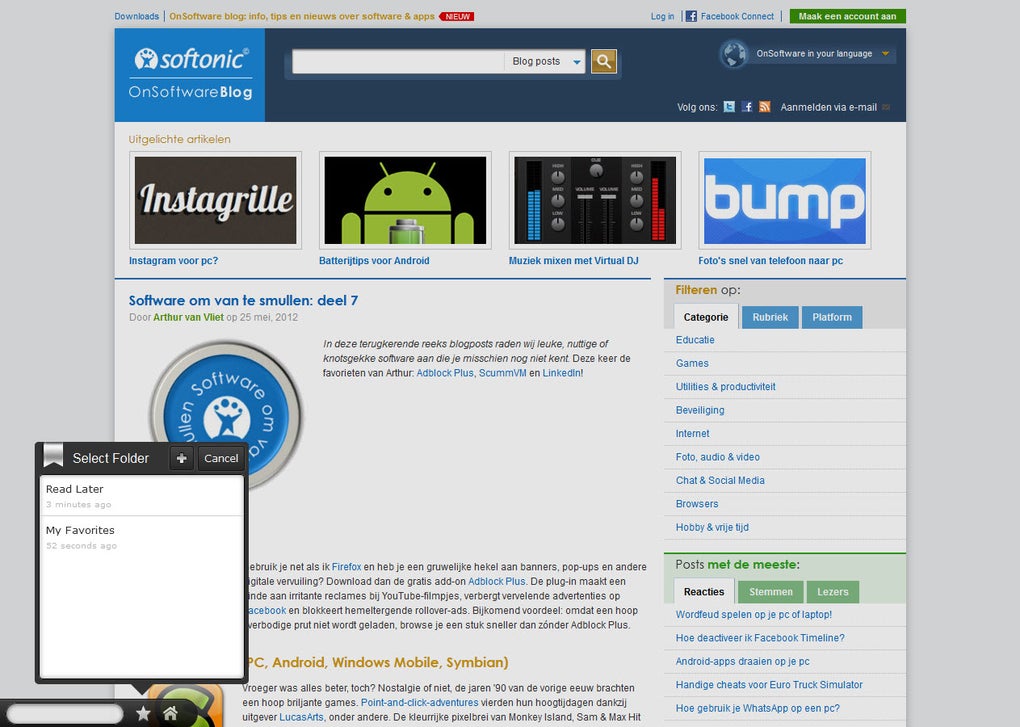
- One‑Click Bookmarking: Click the white star next to any result to add it to your synced Yahoo Axis favorites.
- Cross‑Device Sync: Your bookmarks, recent searches, and reading progress follow you from desktop to mobile.
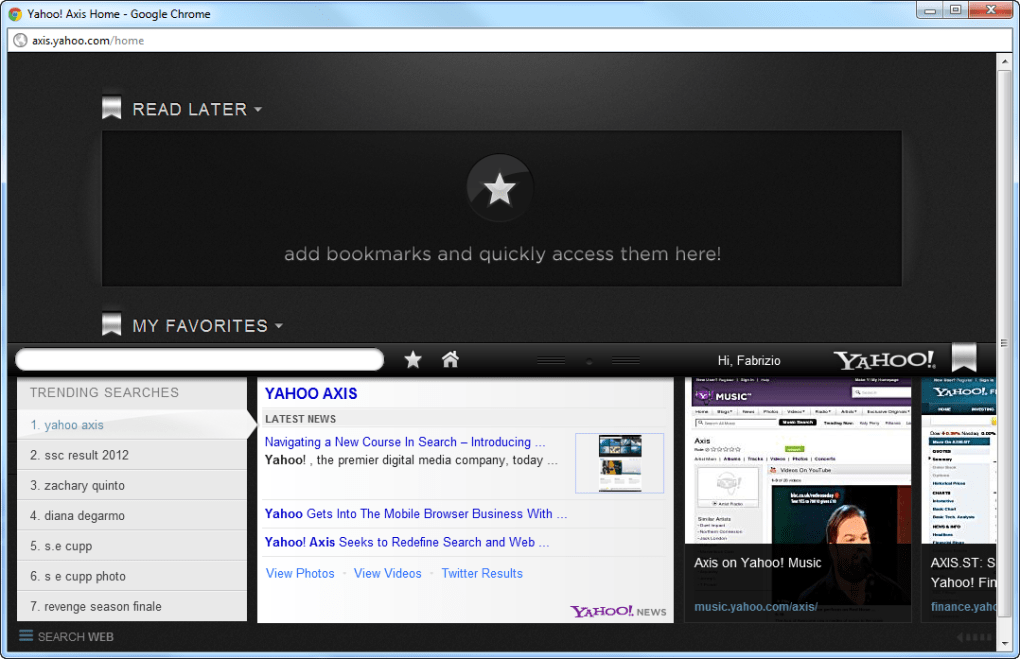
- Full‑Screen Home Page: A dedicated Yahoo Axis home screen aggregates your saved sites and offers quick access to Yahoo’s news and entertainment sections.
- Free & Secure: The extension is free to download, uses HTTPS for all communications, and respects Yahoo’s privacy policy.
- Regular Updates: Yahoo pushes frequent updates to improve performance, add new visual elements, and ensure compatibility with the latest browser versions.
- Customizable Appearance: Users can toggle the bar’s height, choose a light or dark theme, and hide the bar temporarily if needed.
While Yahoo Axis shines in delivering a media‑rich search environment, it also includes some practical utilities such as quick access to Yahoo Mail, Weather, and Finance widgets directly from the bar. This makes the extension a mini‑dashboard for Yahoo power users, reducing the need to juggle multiple tabs.
Installation, Usage & Compatibility
Getting Yahoo Axis up and running is straightforward. Follow these steps to install the extension on your preferred platform:
- Visit the official Yahoo Axis page on the Chrome Web Store, Firefox Add‑Ons site, Microsoft Edge Add‑ons, or the Safari Extensions Gallery.
- Click the “Add to Browser” or “Install” button. A confirmation dialog will appear; accept the permissions, which mainly include reading and modifying data on the sites you visit.
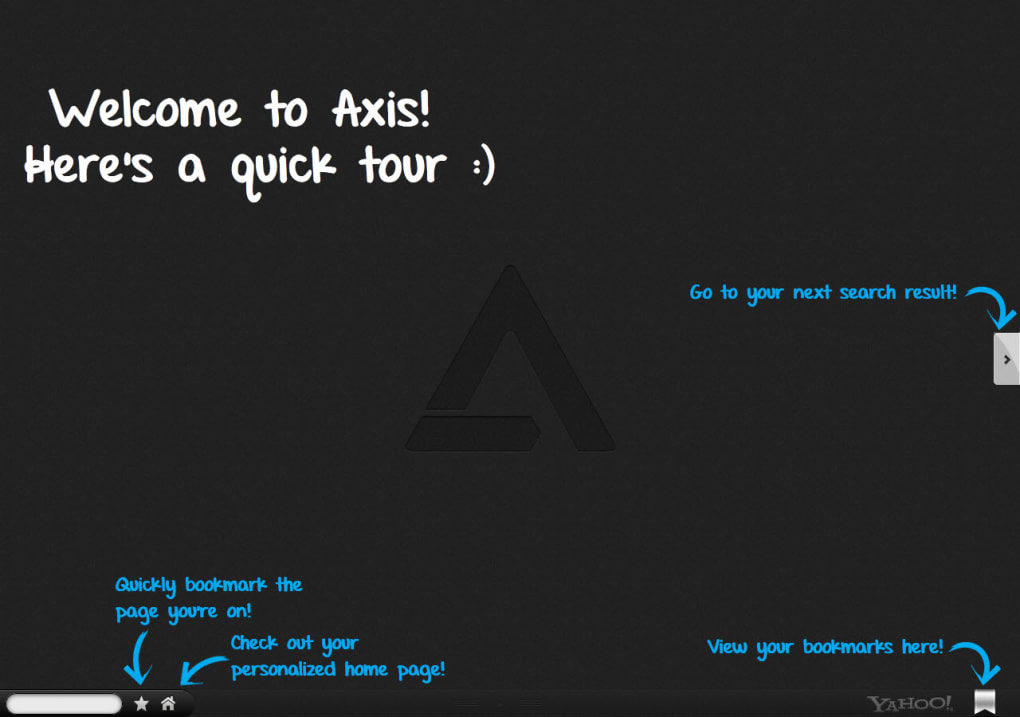
- After installation, the Axis bar will automatically appear at the bottom of your browser window. If it does not show, click the extension icon in your toolbar and select “Show Yahoo Axis.”
- Sign in with your Yahoo account to enable syncing. The sign‑in prompt appears as a small overlay; entering your credentials activates the cross‑device bookmark and history sync.
- Start typing in the bar. As you type, Yahoo Axis begins to pull results, displaying thumbnail previews and a short description for each match.
- To bookmark a result, hover over the result thumbnail and click the white star that appears on the right side of the search box.
- To access the full‑screen home page, click the “Home” icon at the far left of the bar. From there you can manage your saved sites, view Yahoo news feeds, and adjust settings.
For mobile users, download the Yahoo Axis app from the Google Play Store or Apple App Store. The mobile version mirrors the desktop experience, offering the same visual search bar at the bottom of the screen and seamless syncing with the desktop extension.
Supported Operating Systems
Yahoo Axis is compatible with the following operating systems and browsers:
- Windows 10, 11 (Chrome, Edge, Firefox, Opera)
- macOS 11 (Big Sur) and later (Safari, Chrome, Firefox)
- Linux distributions that support Chromium‑based browsers
- Android 8.0 (Oreo) and later (via dedicated app)
- iOS 13 and later (iPhone and iPad via dedicated app)
The extension automatically updates through the respective browser’s extension store. For mobile apps, updates are delivered through the Play Store or App Store. Yahoo recommends keeping both the extension and your browser up to date to avoid occasional freezes that have been reported on older versions.
Overall, the installation process is designed for users of all technical skill levels. Whether you’re a seasoned power user or a casual Yahoo fan, you can have the search bar up and running within a couple of minutes.
Pros & Cons
What Users Love About Yahoo Axis
- Highly visual search results make browsing faster and more engaging.
- One‑click bookmarking with instant sync across desktop, Android, and iOS.
- Free to use and regularly updated for security and performance.
- Integrated access to Yahoo Mail, News, Finance, and Weather widgets.
- Customizable bar size and theme help it blend with different browser layouts.
Areas That Need Improvement
- The permanent bottom bar can feel intrusive, especially on smaller screens.
- Accidental mouse hover may trigger the bar, causing brief UI flicker or occasional browser slowdown.
- iOS version lacks a built‑in search history feature available on desktop.
- No native ad‑blocking or privacy‑enhancing features; users must rely on separate extensions.
- Limited advanced search operators compared to Yahoo’s full‑site search page.
Yahoo Axis delivers a refreshing visual search experience that integrates tightly with Yahoo’s ecosystem. While the constant presence of the bar may not suit everyone, the benefits of instant thumbnails, cross‑device syncing, and free usage outweigh the minor usability quirks. Ideal for Yahoo loyalists and visual search enthusiasts.
Frequently Asked Questions
Is Yahoo Axis completely free, or does it contain hidden fees?
Yahoo Axis is 100 % free to download and use. Yahoo does not charge subscription fees for the extension, and there are no hidden in‑app purchases. The only costs you might incur are standard data charges from your internet provider.
Can I disable the bar temporarily without uninstalling the extension?
Yes. Clicking the small “pin” icon on the left side of the bar collapses it into a thin strip. You can restore it at any time by clicking the same icon again.
Does Yahoo Axis collect my browsing data?
Yahoo Axis only transmits search queries to Yahoo’s servers over a secure HTTPS connection. The extension respects Yahoo’s privacy policy and does not store personal browsing history beyond what is needed for syncing bookmarks and recent searches when you are signed in.
Why does the extension sometimes cause my browser to freeze?
Freezes are usually linked to outdated browser versions or conflicting extensions that also modify the page layout. Updating your browser and disabling other heavy UI extensions typically resolves the issue.
Is there a way to export my Yahoo Axis bookmarks?
Yes. In the full‑screen home page, click the “Export” button to download a JSON file containing all your saved sites. You can later import this file on another device through the same menu.
Conclusion & Call to Action
Yahoo Axis stands out as a niche yet powerful tool for anyone who prefers a visual, media‑rich search experience tightly coupled with Yahoo’s broader suite of services. Its free price tag, cross‑device syncing, and intuitive thumbnail previews make it a compelling addition for Yahoo loyalists, while the occasional UI intrusiveness may deter users who favor ultra‑minimalist browsers. If you spend a good portion of your day reading news, checking finance updates, or browsing Yahoo Mail, installing Yahoo Axis can streamline those workflows and keep your favorite pages just a click away.
Ready to give your browsing a visual boost? Download Yahoo Axis now from the official extension store for your platform. Enjoy free, secure, and constantly updated search right at the bottom of your screen, and experience the convenience of having your Yahoo ecosystem travel with you across every device.







